


Wordfinder by WordTips
4.8419.00 Reviews
App Specs
- Version
- 2.1.14
- Updated On
- License
- Free
- Downloads
- 100,000+
- Developer
- Cliqpod S.L.
- Categories
- Word
- Platform
- Android
Screenshots
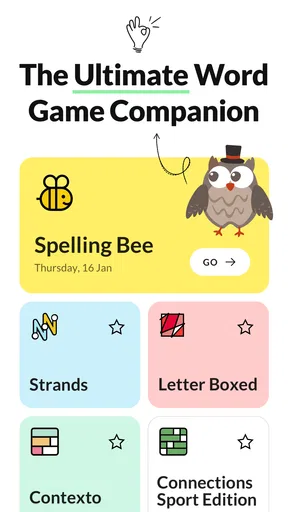
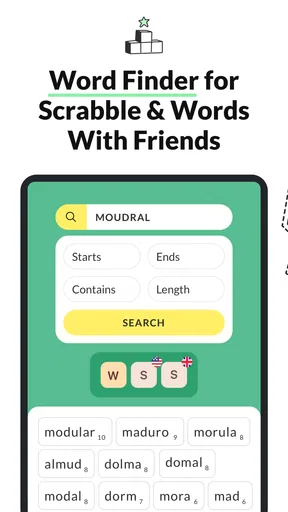
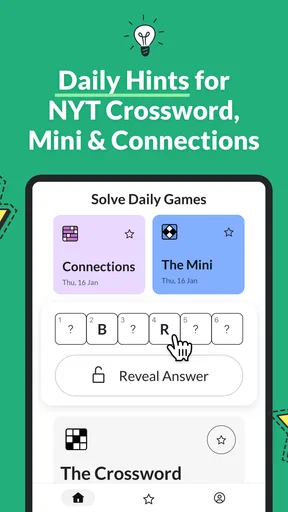
 Analysis by AppCompare
When a word puzzle slows down, I want a tool that helps me get unstuck without turning a quick game into a technical project. Wordfinder by WordTips is a free word game utility from Cliqpod S.L., built around finding possible words from letters and supporting play in familiar formats such as Scrabble and crosswords. I’d treat it as a companion for checking ideas and learning vocabulary, rather than as a replacement for playing the puzzle myself.
Where a quick search can get stuck
The basic idea is simple, but a word solver is only as useful as the letters and rules you give it. If I enter the wrong rack, forget a blank tile, or choose a word length that does not match the available spaces, the results can look irrelevant even when the app is working normally. My first check is always the input: confirm every letter, then remove any filter that might be narrowing the list too far.
There is also a difference between finding a word and knowing whether it is permitted in a particular game. A solver can suggest candidates, but the game you are playing decides which dictionary and board rules apply. I would check a promising answer against the active game before relying on it, especially when playing with house rules or a language setting that differs from the one I normally use.
Simple checks before a round
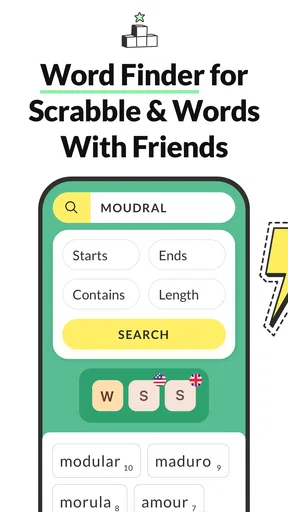
Wordfinder is designed to be direct: enter letters, review suggestions, and use filters such as word length when they help. That makes it approachable for a short search, but it is worth pausing before a timed turn to make sure the language and constraints match the puzzle. If the list seems unexpectedly short, try loosening the length filter and checking the letters again rather than assuming there are no playable options.
The game is listed for everyone and is free to download, with optional in-app purchases priced from $1.99 to $17.99 per item. Its average rating is 4.8 from around 3,800 ratings, and it has over 100,000 installs. Those figures suggest that many players have found a use for it, though they do not tell me whether its approach suits every kind of word-game fan. The current version is 2.1.14, and it runs on Android 7.0 or later.
Making the solver useful without losing the fun
I find the solver most useful when I treat its suggestions as a starting point, not a verdict: checking the board and the game’s rules is still part of making a good play. In this section, I’d focus on a simple way to use word searches for both a live turn and later practice, while keeping the puzzle’s enjoyment—and any shared rules with other players—in view.
A practical workflow for play and practice
For a live turn, I would use the app in a short sequence: enter the rack carefully, narrow by length only when the board makes that restriction clear, and scan the results for a move that fits the position. It is tempting to pick the first long or unfamiliar word, but a valid word is not automatically the best move. Board placement, available spaces, and the game’s scoring rules still matter, so I use the suggestions as a shortlist rather than a command.
Worth Reading Before You Choose

EA SPORTS FC Mobile 26 Is a Bigger Football Game, but It Takes Time

Flipboard Shows What News Apps Must Do Beyond the Feed

Switching to Android Auto Means Rethinking Your Driving Routine

Google Calendar Makes a Crowded Week Easier to Manage

Ludo King Makes the Most of the Minutes Between Plans

Baby Panda World Brings Quick Play to Modern Phones, but Its Game Library Feels Busy
For practice, I get more value by checking a difficult rack after the round and noticing patterns in the answers. A useful habit is to save or jot down a word only when I can remember why it worked: perhaps a familiar ending, a less obvious combination of letters, or a word I can reuse in a future puzzle. That turns a solver from a one-time answer machine into a light vocabulary aid. It also helps keep a friendly game enjoyable; if everyone is playing casually, I would agree on whether outside help is welcome before opening a solver mid-match.
When the app is not the cause
If results do not match what I expect, I would first check the puzzle itself: a tile may be blank, a letter may have been read incorrectly, or the board may impose a restriction that the search does not know about. I would then review any selected language or word-length setting. These checks are more useful than repeatedly restarting the app, because many apparent search problems come from a mismatch between the entered rack and the game situation.
For a general connection or loading hiccup, I would close and reopen the app, check that the device has a working connection if the current task needs one, and try again. I would not assume every part of the experience behaves the same way offline simply because a basic search may remain usable without a connection. If a problem keeps returning, updating to the current version is a sensible first step; the game is developed by Cliqpod S.L.
Who will get the most from it
I can see this fitting players who regularly tackle letter-based puzzles, enjoy comparing possible plays, or want a quick nudge when a rack feels unpromising. It is also useful for solo practice: take a handful of letters, explore the candidate words, then challenge yourself to spot a better answer before checking. The multilingual support described for the app can make it more appealing to people who play in more than one language, provided they take care to select the language that matches the game.
It is less suitable for someone who wants a full Scrabble board analysis or automatic advice about the strongest strategic move. Word suggestions do not replace judging the board, and a solver can make a social game feel less satisfying if one player consults it secretly. For strict competition, I would follow the event’s rules; for a relaxed match, I would use it openly or save it for review afterwards.
How it compares with other ways to find words
Compared with searching a general dictionary, a dedicated word finder is more convenient when I already have a set of letters and need candidates quickly. A dictionary is better when I want a definition, usage examples, or confidence about a word’s meaning; a solver is better for exploring what those letters might form. Compared with trying every arrangement myself, the app can save time, but that speed comes at a cost: it can take away the satisfying discovery that makes a puzzle enjoyable.
It is also different from a complete board assistant. The useful question here is not simply “What is the longest word?” but “Which suggestion fits the spaces and rules I can actually use?” I would check the game board independently and treat the app’s output as possibilities, not a guarantee of a legal or high-scoring play. That distinction matters most when a game uses its own dictionary or has special constraints.
What to expect from the experience
In my experience, the appeal is its focused approach: the main task is easy to understand, and filtering by word length can make a crowded set of suggestions more manageable. The option to save words, mentioned in the app’s play experience, can also help if I want to revisit vocabulary rather than search the same letters repeatedly. Still, saved discoveries are most useful when I add a little context for myself; a bare list is easy to forget.
There are trade-offs. A fast answer can encourage me to stop thinking too early, and unfamiliar words may not fit the rules of every game. Optional purchases are available, but I would start with the free download and see whether the basic workflow suits my habits before spending anything. The listed purchase range is $1.99 to $17.99 per item, so I would check the in-app options carefully rather than assume every paid item offers the same thing.
First impressions
When I downloaded Wordfinder by WordTips, I was immediately struck by its clean and intuitive interface. The app doesn’t waste time with unnecessary frills; it’s straightforward and to the point. The main screen lets you enter your letters, and boom, it’s like magic—a plethora of word options appear almost instantly. This simplicity is refreshing in a world where apps often try to do too much at once.
Features That Stand Out
One of the coolest features of this app is its ability to handle not just English but a variety of languages. This is a game-changer if you’re someone who enjoys multilingual word puzzles. Additionally, you can filter results by word length, which is incredibly handy when you have limited spaces on your game board.
If you’re worried about getting stuck with just basic vocabulary, you’ll be thrilled to know that the app offers a diverse dictionary. It doesn’t just give you common words but also those high-scoring, lesser-known gems that can turn the tide in your favor. I found myself learning new words and expanding my own vocabulary while using it.
Using the App in Real-Time
In the heat of a game, speed is of the essence, and this app delivers. It’s fast, responsive, and doesn’t lag, which is crucial when you’re racing against the clock. I tested it out during a few rounds of Scrabble with friends, and it was a lifesaver. I particularly enjoyed the option to save words for later, which helped me keep track of useful strategies for future games.
User Experience
Navigating through the app is a breeze. The developers have clearly prioritized user experience, ensuring that even those who aren’t tech-savvy can find their way around without a hitch. The app runs smoothly on both Android and iOS, and I encountered no crashes or bugs during my testing.
Another perk is its offline capabilities. You can still use it when you’re out of range of Wi-Fi or mobile data, meaning you’ll never be left hanging in the middle of a crucial game.
Why It’s Worth It
While there are many word finder apps out there, what sets Wordfinder by WordTips apart is its comprehensive approach and reliability. It’s not just a tool; it’s a companion that enhances your gameplay and makes you a formidable opponent. Plus, it’s free to download, with optional in-app purchases, so you can test the waters without any commitment.
For serious word game enthusiasts, the premium version offers even more features, like no ads and additional word lists, which can further elevate your game. But even the free version is packed with enough features to give you a significant edge.
Final Thoughts
In conclusion, Wordfinder by WordTips is a must-have for anyone who loves word games. It’s efficient, user-friendly, and packed with the features you need to outsmart your opponents. Whether you’re a casual player or a seasoned pro, this app is sure to become your go-to resource for all things word-related.
So, if you’re ready to up your word game and impress your friends with your newfound vocabulary prowess, give Wordfinder by WordTips a try. You won’t be disappointed.
Pros
- User-friendly interface for quick navigation.
- Extensive word database supports multiple games.
- Offline access available for uninterrupted use.
- Customizable settings enhance user experience.
- Regular updates ensure fresh content and features.
Cons
- Ads can be intrusive and disrupt usage.
- Limited features in free version.
- Occasional lag in search results.
- Not all game dictionaries supported.
- No in-app tutorials for beginners.
FAQs for Wordfinder by WordTips
What is Wordfinder by WordTips and how does it work?
Wordfinder by WordTips is a versatile app designed to help users improve their word game skills. It works by allowing users to input letters and receive potential word combinations, maximizing scoring opportunities in games like Scrabble and Words with Friends. The app's intuitive design makes it easy to navigate, providing quick results to enhance your gameplay.
Is Wordfinder by WordTips free to use, or are there any premium features?
Wordfinder by WordTips offers a free version with essential functionalities for all users. However, there are premium features available through in-app purchases. These may include advanced tools such as detailed word analysis, ad-free experience, and enhanced search capabilities, providing a more comprehensive and uninterrupted user experience.
Can Wordfinder by WordTips be used offline?
Wordfinder by WordTips primarily requires an internet connection to access its full range of features and up-to-date word databases. While some basic functionalities might be available offline, a stable connection is recommended for optimal performance and to ensure you have the most current word suggestions and updates.
Is Wordfinder by WordTips compatible with both Android and iOS devices?
Yes, Wordfinder by WordTips is compatible with both Android and iOS devices. It is designed to work seamlessly across platforms, ensuring that users can enjoy its features on their preferred device. Regular updates help maintain compatibility with the latest operating systems and enhance overall user experience.
How does Wordfinder by WordTips ensure the accuracy of its word suggestions?
Wordfinder by WordTips uses a comprehensive and regularly updated word database to ensure accuracy in its suggestions. The app cross-references multiple sources to provide legitimate words, adhering to the official rules of popular word games. This rigorous approach helps users trust the app’s suggestions during gameplay.


